Ornith is an open-source agentic coding model that serves an OpenAI-compatible API. Claude Code only speaks the Anthropic API. To use one to drive the other, you put a translation proxy (LiteLLM) in the middle and point Claude Code at it with two environment variables. I built the whole thing on a single EC2 box with Terraform, first on CPU (c7i.4xlarge, llama.cpp) and then on GPU (g6e.xlarge with an L40S, vLLM). The CPU version works but is unusable for real work: Claude Code's ~43K-token system prompt takes about 7 minutes just to read. On the GPU that same prompt processes in about 4 seconds. Same model, same architecture, one variable changed.
What Ornith Is, and Why This Is Interesting
Ornith is a family of open-source coding models built for agents rather than humans. It ships in several sizes (a 9B dense model, plus larger Mixture-of-Experts variants) and it exposes an OpenAI-compatible endpoint with tool calling. That last part is the hook: any tool that speaks OpenAI-style chat completions can drive it.
Claude Code is my daily agentic coding tool. The question I wanted to answer was simple: can I run Ornith myself, on my own infrastructure, and point Claude Code at it instead of a hosted model? No API key, nothing leaving my box, just an experiment to see the model work under a real agent harness.
The answer is yes. The interesting part is what it took, and what the CPU-versus-GPU gap actually looks like when you measure it.
The Architecture: Why There's a Translator in the Middle
The thing that trips people up first: Claude Code is hardcoded to speak exactly one wire format, the Anthropic Messages API. It does not matter what model sits behind it. Every request it sends is Anthropic-shaped JSON. Ornith, served by llama.cpp or vLLM, only understands OpenAI-shaped JSON. Different field names, different tool-calling structure, different streaming events. They cannot talk to each other directly.
So you run a proxy in the middle whose entire job is translation. LiteLLM does this well: it exposes an Anthropic /v1/messages endpoint, converts each request to OpenAI format, calls Ornith, then converts the response back to Anthropic format so Claude Code understands it.
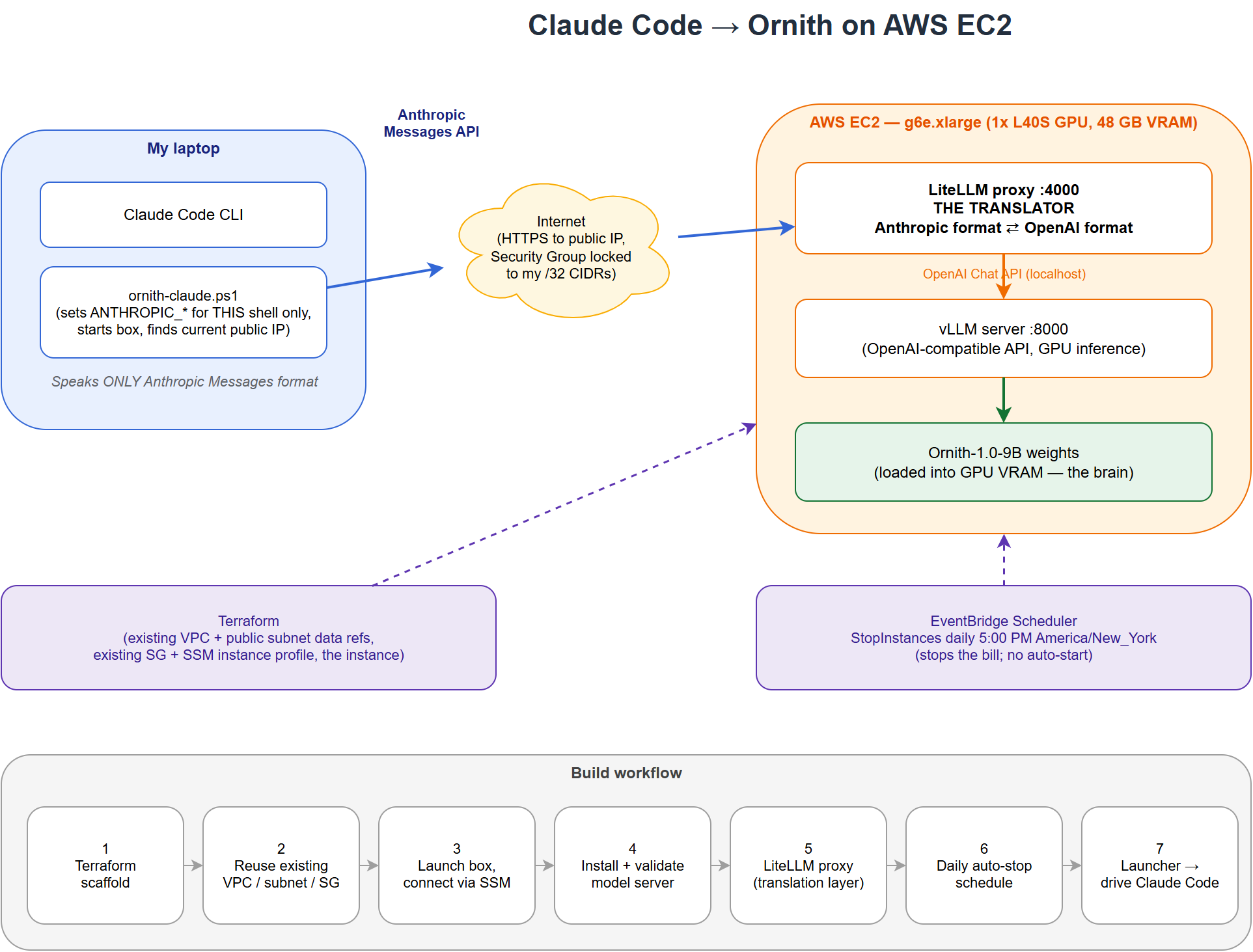
You wire Claude Code to the proxy with two environment variables:
export ANTHROPIC_BASE_URL="http://<ec2-ip>:4000"   # the LiteLLM proxy
export ANTHROPIC_AUTH_TOKEN="sk-anything" # dummy, the proxy accepts itClaude Code checks that some auth token exists before it starts, but when you point it at your own proxy that token is just a dummy string the proxy accepts. Nothing gets validated against Anthropic and no request touches their servers. The only thing you are using from them is the CLI itself as the agent front-end.
The Build
I kept the footprint deliberately small. Everything lives on one EC2 instance in a public subnet of an existing VPC, with a public IP assigned on launch and no Elastic IP. Inbound is locked to my own IP through a security group. Shell access is over SSM, so there is no key pair and no port 22 exposed.
Terraform handles the instance, and it references the existing network rather than creating a new VPC. One design decision worth calling out: I did not bootstrap the software through blind user-data on the first build. Too many unknowns (a source compile, tool-calling flags, a proxy config that has to be exactly right). Instead I launched a bare box, installed and validated every stage interactively over SSM, and only then captured the working commands into a script. Debugging happens where you can see stderr, and the resulting user-data is tested rather than hopeful.
The install itself is two systemd services:
- A model server on
127.0.0.1:8000(llama.cpp on CPU, vLLM on GPU), serving Ornith with an OpenAI-compatible API and tool calling enabled. - The LiteLLM proxy on
0.0.0.0:4000, exposing the Anthropic endpoint that Claude Code connects to.
A small launcher script on my laptop sets the two environment variables for that shell only, then starts Claude Code. That scoping matters: I did not want every Claude Code session on my machine suddenly routing to Ornith. Set the variables in one throwaway terminal and only that session uses the local model. Every other session is untouched.
The Gotchas Nobody Mentions
A handful of things bit me, and they are the parts worth writing down.
Claude Code's prompt is enormous
My first turn failed with a context-window error. The culprit was not my question. Claude Code's system prompt plus all its tool schemas come to roughly 43,000 tokens before you type a single character. My conservative 32K context rejected it outright. You need a large context window (I run 128K), and on a memory-constrained box you quantize the KV cache to fit.
Ornith is a reasoning model
Responses come back with the thinking separated into a reasoning field. If you cap max_tokens too low while testing, the model spends the whole budget thinking and returns empty visible content. It looks broken. It is not. Give it room.
The GPU path has a compiler dependency chain
On GPU, vLLM's kernel backends JIT-compile at startup, and that quietly needs a few things present: the dev headers for your Python, plus ninja and nvcc on the service's PATH. The Deep Learning AMI ships the CUDA toolkit, but systemd's minimal PATH could not see it, so vLLM died with a FileNotFoundError: 'ninja' that had nothing to do with ninja being missing and everything to do with PATH. Ornith also uses a custom model architecture, so vLLM needs --trust-remote-code to load it.
The Deep Learning AMI and the base Linux image both ship Python 3.9. Both vLLM and LiteLLM use newer union-type syntax that only parses on 3.10+. Install 3.11 and build your virtual environments against that, or you will chase confusing import-time errors that look like package bugs but are really a Python version mismatch.
CPU vs GPU: The Sample Test
This is the part I actually wanted to measure. I ran the same Ornith-9B model on two boxes and timed two things: how fast it generates tokens (decode), and how fast it reads a large prompt (prefill). Prefill is the one that matters for an agent, because the agent sends a huge prompt on every turn.
| Metric | CPU (c7i.4xlarge, llama.cpp) | GPU (g6e.xlarge / L40S, vLLM) | Speedup |
|---|---|---|---|
| Generation (decode) | ~8.6 tokens/sec | ~43.8 tokens/sec | ~5x |
| Prompt processing (prefill) | ~95 tokens/sec, degrading as context grows | ~9,940 tokens/sec | ~100x |
| 43K-token Claude Code prompt | ~7 minutes to first token | ~4 seconds | night and day |
The decode speedup is real but modest, roughly 5x. The prefill speedup is the whole story. On CPU I watched llama.cpp grind through Claude Code's prompt in the logs, and the throughput actually got worse as it went, from about 95 tokens/sec down into the 30s, because each new chunk has to attend over everything before it. On the GPU the same 40K-token prompt processes in about four seconds flat.
Put plainly: on CPU, every single turn in Claude Code starts with a multi-minute stall before the model says anything. It proves the architecture works. It is not something you would actually use. On the GPU that stall disappears and it starts to feel like a normal agent session, just backed by a 9B model instead of a frontier one.
The CPU box costs about a third of the GPU box per hour and is genuinely enough to confirm the whole chain end to end: tool calls round-trip correctly, the translation proxy behaves, Claude Code drives the model. If your goal is a proof of concept rather than daily use, do not pay for the GPU. If you want to actually work in the session, the GPU is not optional.
Then I Ran It on a Spare Laptop with No Cloud at All
The EC2 versions prove the pipe works and make it usable, but both still live in a cloud account. So I pushed the idea to its logical end: a spare laptop on my own LAN, nothing in AWS, nothing leaving the house. If the whole reason to self-host is that no data crosses a boundary you control, a machine physically on your desk is the strongest version of that.
The box was an old ultraportable. A six-core low-power AMD mobile chip, about 15 GB of RAM, and an integrated Radeon GPU with no video memory of its own. I did the entire install remotely over PowerShell remoting and never opened the laptop's lid. The stack was the same as the EC2 CPU path with one change: instead of running purely on the CPU, I used llama.cpp's Vulkan backend so the integrated GPU could take the compute. An integrated GPU shares system RAM rather than having its own, so there is no extra memory to gain, but the graphics cores can still push matrix math faster than six low-power CPU cores.
It loaded, and it answered. Asked to multiply two numbers it came back with the right result through the full Anthropic-to-Ornith chain, so end to end the thing genuinely runs on hardware that costs less than a month of the GPU box. Here is how it measured against the two EC2 boxes.
| Metric | Laptop (integrated GPU, Vulkan) | EC2 CPU (c7i.4xlarge) | EC2 GPU (L40S) |
|---|---|---|---|
| Generation (decode) | ~2.8 tokens/sec | ~8.6 tokens/sec | ~43.8 tokens/sec |
| Prompt processing (short prompt) | ~31 tokens/sec | ~95 tokens/sec | ~9,940 tokens/sec |
The Vulkan backend did engage. The integrated GPU's compute unit sat pinned at 100% during generation, so this is not a case of it quietly falling back to the CPU. This is simply what a 15-watt integrated GPU sharing slow laptop memory can do. It beats running purely on the laptop's own CPU cores by roughly 40% on prompt processing, but it lands well below even the EC2 CPU box, which has sixteen server cores and far more memory bandwidth to work with.
Where It Stops Being Slow and Starts Being Broken
That clean benchmark understates the problem, because a real agent prompt is not a short one. When I actually pointed Claude Code at the laptop and asked it a simple question, I watched the logs prefill the real prompt, which came to about 34,000 tokens of system instructions and tool schemas. Two things happened.
First, the prefill rate fell as the context grew, the same degradation the CPU box hinted at but much sharper. It started around 46 tokens per second on the first chunk and dropped into the low twenties a quarter of the way in, because each new chunk of prompt has to attend over everything before it and that cost climbs with length.
| Prompt processed | Throughput on that chunk | Share of the 34K prompt |
|---|---|---|
| 2,048 tokens | ~46 tokens/sec | 6% |
| 4,096 tokens | ~31 tokens/sec | 12% |
| 6,144 tokens | ~27 tokens/sec | 18% |
| 8,192 tokens | ~24 tokens/sec | 24% |
Second, and this is the real lesson, the request never finished. At that rate, prefilling all 34,000 tokens would have taken close to half an hour. Long before that, Claude Code's own client-side timeout gave up, cancelled the request, and started over from scratch. So the box was not merely slow. It was stuck in a loop of beginning a prefill, getting killed by the agent's timeout, and beginning again, which is why after seven minutes of waiting there was nothing on screen at all.
On the EC2 CPU box the multi-minute prefill was painful but it completed, so you could technically work if you were patient. On this laptop the prefill is slow enough that the agent's built-in timeouts abort it before it ever returns a single token. That is a real line. Slow enough, and a coding agent does not just feel bad, it stops functioning, because the harness assumes a response arrives inside a reasonable window.
So the laptop answers the "nothing leaves your realm" question in the purest form there is, with zero cloud footprint at all, and it also draws the floor. Ornith's 9B model on a low-power integrated GPU is a fine demonstration of the plumbing and a genuinely bad place to get work done. The lesson from the EC2 comparison holds and sharpens: prefill throughput is the whole game for an agent, and below some threshold the agent's own assumptions about latency turn slowness into outright failure.
Keeping the Bill Sane
A GPU instance left running overnight is how you get a surprising invoice. I added an EventBridge Scheduler rule that stops the instance every day at 5 PM in my timezone, with a tiny IAM role scoped so it can only stop that one instance. It does not auto-start, on purpose. The launcher script on my laptop starts the box when I want it, waits for the services to come up, and because there is no Elastic IP it looks up the current public IP each time (the IP changes on every stop and start). The model weights and both services persist on disk, so a restart is just a boot, not a reinstall.
Everything I built for the CPU version transferred to the GPU version unchanged: the Terraform, the security group, the proxy, the launcher, the auto-stop. The only real differences were the instance type, the AMI, and swapping llama.cpp for vLLM. That is the nice thing about keeping the translation layer separate from the model server. The agent front-end never knows or cares what is running underneath.
Is It Worth It on Cost?
Purely on dollars, there is a clean breakeven against a hosted plan. A GPU box at about $1.86 an hour crosses $100 a month at roughly 54 hours of runtime, which works out to around two and a half hours of GPU time per workday. Factor in the small EBS charge that bills even while the box is stopped and real breakeven lands closer to 48 hours a month.
| GPU usage | Monthly EC2 (compute + ~$10 EBS) | vs a $100/month hosted plan |
|---|---|---|
| ~1 hr/workday (22 hrs) | ~$51 | cheaper to self-host |
| ~2.5 hr/workday (54 hrs) | ~$110 | roughly breakeven |
| ~8 hr/workday (176 hrs) | ~$337 | self-host much more expensive |
| Left running 24/7 | ~$1,350 | wildly wasteful |
That comparison is misleading though, because you are not buying the same thing. A hosted plan gives you frontier models. This box gives you a 9B open model that is far less capable at real agentic coding. Even at exact cost breakeven you would be paying the same money for a much weaker tool. On a value-per-dollar basis, for simply getting work done, the hosted plan wins for almost anyone. Self-hosting Ornith is never the cost-optimal choice for capability, and it is worth being honest about that.
If your goal is coding output per dollar, keep the hosted plan and treat a box like this as a lab you spin up occasionally. A few hours here and there stays cheap. The moment you are running it several hours a day, every day, you are paying more for less capability.
The Real Reason to Do This: Nothing Leaves Your Realm
Cost is not why you would run this. Data is. When Ornith serves the model on your own instance and Claude Code talks to a proxy on that same box, no prompt, no file, no code, and no response ever leaves infrastructure you control. There is no API key, no hosted account, and nothing crosses the boundary to a third party. Your source, your internal context, your proprietary logic all stay inside your own account.
That changes the calculus for a specific set of situations:
- Data that contractually or legally cannot leave your environment. Client code under strict handling terms, regulated data, air-gapped or isolated networks. If sending a proprietary codebase to any external service is off the table, a self-hosted model is one of the few ways to still get an agentic coding assistant on it.
- Full control of the boundary. You decide what the model sees, where it runs, how long logs live, and who can reach it. In this build the endpoint is locked to my own IP and shell access is over SSM, so the surface is small and entirely mine.
- No dependence on an outside provider. No rate limits you did not set, no model deprecations on someone else's schedule, no per-request metering. You own the uptime and the model version.
- Learning how the pieces fit. Wiring an agent harness to an open model teaches you exactly where the seams are: the wire format, the tool-calling contract, the context budget, the serving engine. That understanding is useful even if you go back to a hosted model afterward.
So the honest framing is two separate questions. If the question is "what is the cheapest way to get good coding help," this is not it. If the question is "how do I get an agentic coding assistant on data that is not allowed to leave my walls," then a self-hosted model like Ornith is exactly the tool, and the EC2 cost is just the price of keeping everything in your own realm.
Want Help With This?
If you're working on something similar and want a second set of eyes, or you'd like to talk through how this applies to your environment, reach out via the contact form. Happy to help.