A client wanted EC2s in a private subnet to reach github.com/their-org but nothing else on github.com. I built a Terraform sandbox to see if AWS Network Firewall could actually do it. It can, but it took three non-obvious fixes: don't put a blanket pass tls github.com rule (it passes the whole flow and every path leaks through), use flowbits to allow the response direction only for the tagged org-path request, and pin clients to HTTP/1.1 because the firewall's http.uri keyword doesn't inspect HTTP/2 and github speaks h2 by default. Final result: git clone, pull, and push to the approved org all work, including a 184 MB clone, while other github paths, other domains, and SSH get blocked. The real gotchas turned out to be narrower than I expected: Git LFS, release-asset, and raw-file downloads break because they live on githubusercontent.com, and the whole filter only works over HTTP/1.1, so clients have to be pinned to it. So it works, but I still wouldn't sell it as the real control for "only our org."
The Ask
The requirement sounded simple. Developer boxes live in a private subnet. They should be able to pull from the company's GitHub org, github.com/acme-eng, and nothing else on github.com. No random other user's repos, no gists under someone else's account, just the org.
The instinct is "put it in the firewall." And the client already had AWS Network Firewall in the design, so the question landed on my desk as: can Network Firewall allow a URL path on a domain while blocking the rest of that same domain?
The honest answer is "sort of, and you'll learn a lot about TLS on the way." So instead of guessing, I built the whole thing in a throwaway account and tested it end to end.
The Sandbox
Everything is Terraform so I could tear it down the moment I had my answer (Network Firewall is not cheap to leave running). The lab is a single-AZ VPC with three subnets and no bastion.
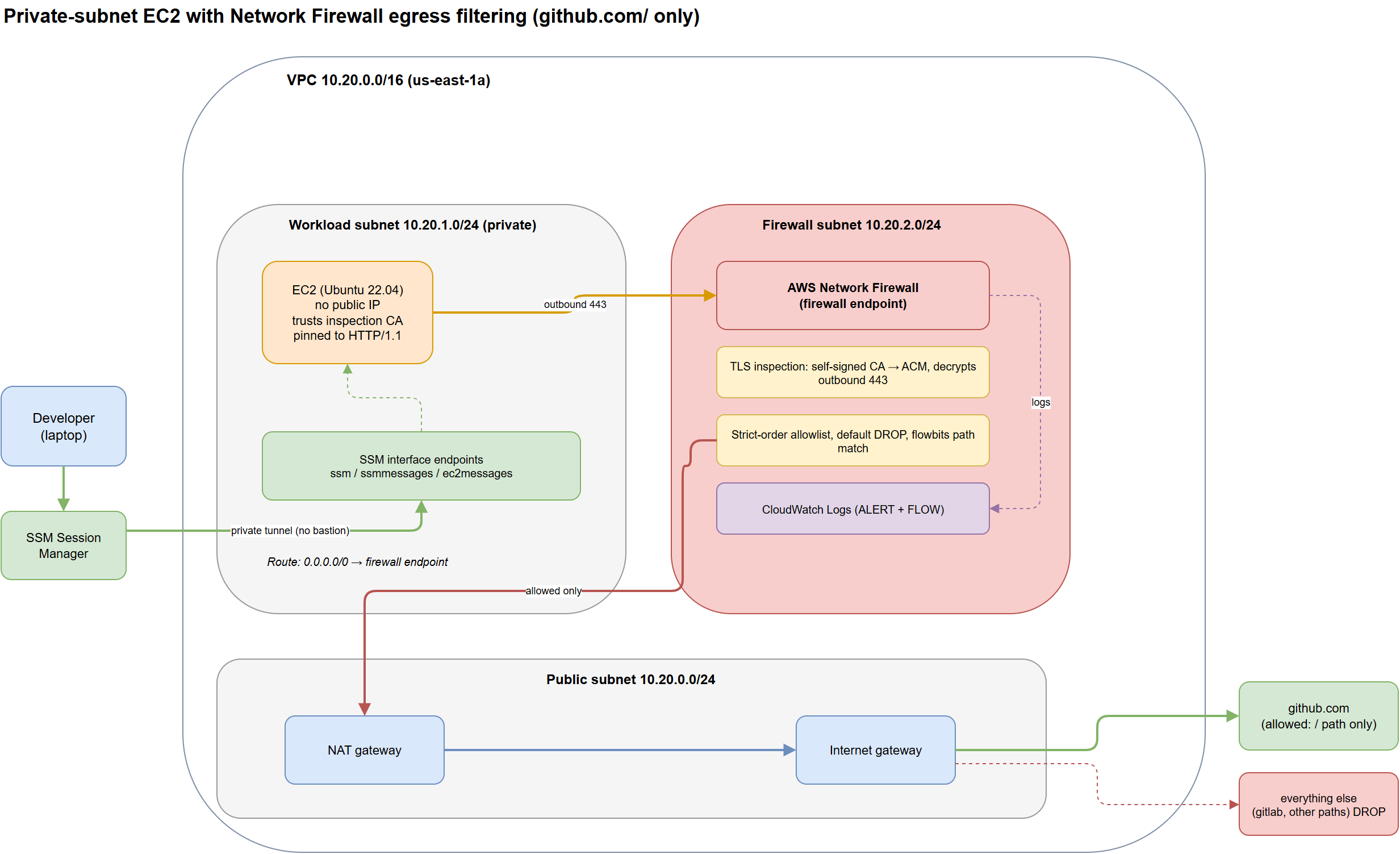
- Workload subnet (private). An Ubuntu EC2 with no public IP. I reach it purely over SSM Session Manager via interface endpoints, so my access path never touches the firewall and there's no inbound port open anywhere.
- Firewall subnet. The Network Firewall endpoint. The workload subnet's default route points at it, and it does TLS inspection plus a strict-order allowlist that defaults to drop.
- Public subnet. NAT gateway and internet gateway. Only traffic the firewall passes ever gets here.
TLS inspection is the part that makes path filtering even theoretically possible. Without it, the firewall only sees the TLS SNI (the hostname), never the URL. With it, the firewall generates a CA, I import that CA into ACM, and the firewall decrypts outbound 443, reads the HTTP request, and re-encrypts. The EC2 has to trust that CA or every HTTPS call fails cert validation, so the instance user-data drops the CA into the OS trust store on boot.
Reaching the box over SSM interface endpoints keeps developer access completely off the egress firewall path. No public IP, no SSH port, no jump host to harden. The firewall's only job is outbound filtering, which keeps the mental model clean: inbound is SSM-only, outbound is allowlist-only.
Fix 1: Don't Pass the TLS Flow
My first ruleset looked reasonable. Allow the TLS handshake to github, then allow the specific HTTP path:
pass tls  ... (tls.sni; content:"github.com"; endswith; ...)
pass http ... (http.host; content:"github.com"; http.uri; content:"/acme-eng"; startswith; ...)
Test result: github.com/acme-eng returned 200. Good. And github.com/torvalds also returned 200. Not good.
The problem is that pass tls in Network Firewall passes the entire flow. Once the TLS handshake matches and the flow is allowed, every HTTP request inside that connection rides through without the http.uri rule ever getting a vote. So the blanket TLS pass silently defeated the whole point.
The fix is counterintuitive: remove the TLS pass entirely. TLS inspection decrypts github on its own because github is in the inspection scope (any outbound 443). You don't need, and actively don't want, a rule that passes the flow at the TLS layer. Let the decrypted HTTP be the thing your rules act on.
Fix 2: Flowbits for the Return Trip
With the TLS pass gone, I retested. Now everything to github reset, including the allowed org path. Progress of a sort.
The error message was the tell: OpenSSL SSL_read: Connection reset by peer. SSL_read means the TLS handshake completed and the connection died while reading the response. So the request was getting allowed, but the reply from github was hitting the default drop. My rule only passed the to_server direction. The to_client return traffic had no matching pass, so it dropped, and the connection reset even for the good path.
You can't match the response by URL, because the URL only exists in the request. The clean way to handle this in Suricata is flowbits: tag the flow when the allowed request matches, then pass the response only for tagged flows.
# tag the org-path request, then allow the reply for tagged flows only
... http.uri; content:"/acme-eng"; startswith; flowbits:set,gh_ok; ...
pass tcp ... (flow:established,to_client; flowbits:isset,gh_ok; ...)
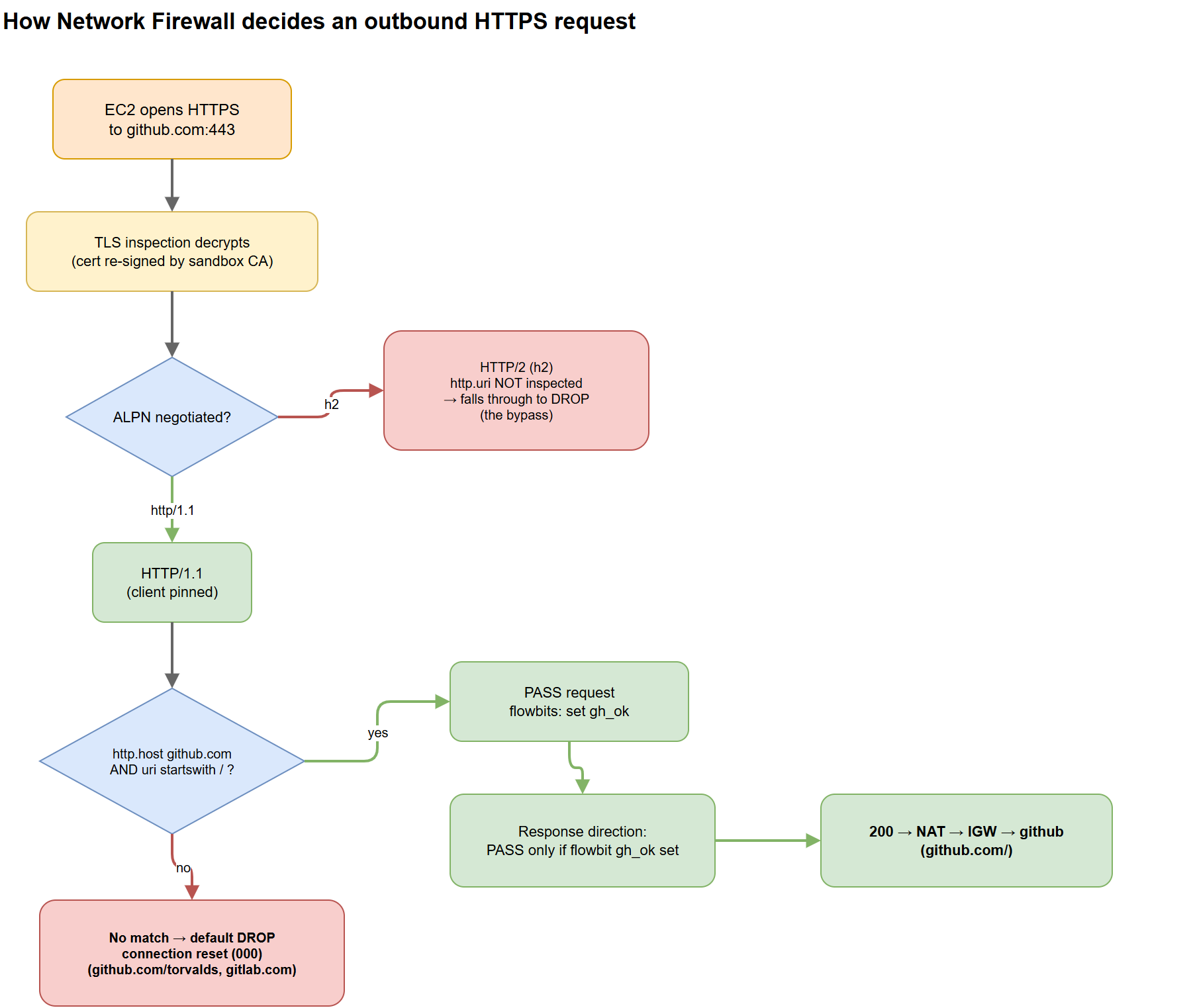
Now the allowed path passes both directions, and any other path never gets tagged, so its request hits the default drop and resets. This is the mechanism the flow diagram below walks through.
Fix 3: The One That Cost Me the Most Time (HTTP/2)
Flowbits in place, I ran the tests again with plain curl. The allowed org path still reset. But forcing curl --http1.1 made it return 200 instantly. Same rule, different HTTP version, completely different outcome.
Network Firewall's http.uri and http.host keywords inspect HTTP/1.x. GitHub negotiates HTTP/2 by default through the TLS ALPN extension (h2). When the connection is h2, the path rule simply doesn't match, so the request falls straight through to the default drop. To verify TLS inspection was even working, I checked the cert the client saw: issuer sandbox-testlab Egress Inspection CA, my CA, so decryption was definitely happening. The firewall was decrypting the traffic and then not understanding the h2 request framing well enough to match the path.
The workaround is to pin clients to HTTP/1.1. On the instance that means a global curl setting and a git config, baked into user-data so a fresh box comes up already pinned.
It's tempting to call this a bypass. In a default-drop allowlist like this one, it isn't. An HTTP/2 request doesn't match the path rule, so it hits the default drop and gets blocked, including requests to your own approved org. That's exactly why you have to pin HTTP/1.1 for legitimate traffic to work: forcing HTTP/2 doesn't get you to a forbidden repo, it gets you dropped. So it fails closed. The real risk is second-order. HTTP/2 breaks legit access, and the tempting fix is to allow github.com at the domain level so HTTP/2 works again, which throws away the org-path restriction entirely. The control is safe as built. Just don't loosen it to make the breakage go away.
How a Request Actually Gets Decided
Putting the three fixes together, here's the decision path for a single outbound HTTPS request once TLS inspection has decrypted it.
The Result
From the private EC2, with plain commands (no special flags, because the box is pinned to HTTP/1.1 by user-data):
| Request | Result | Why |
|---|---|---|
github.com/acme-eng |
200 | URI matches, flow tagged, both directions pass |
github.com/torvalds |
reset (000) | same domain, different path, never tagged, default drop |
gitlab.com |
reset (000) | different domain, no rule, default drop |
That is exactly what the client asked for. Same domain, one path allowed, everything else including the rest of github blocked, enforced at the network layer with no agent on the box beyond trusting a CA.
But Does Real Git Actually Work? I Tested Every Operation
The curl test proves the path rule fires, but nobody develops with curl. The claim I actually needed to check was whether a real git workflow survives the filter, and whether a clone quietly fans out to other GitHub hostnames the way people assume it does. So I created a throwaway repo under the test org, cloned it, pulled, pushed a real commit, and watched every hostname git touched.
| Operation | Result | Hosts / notes |
|---|---|---|
git clone, repo in org |
works | github.com only |
git clone, 184 MB repo |
works | github.com only, no redirect |
git pull |
works | |
git push (real commit) |
works | commit landed on the remote |
git clone, repo outside the org |
blocked | reset |
| ZIP archive download | works | redirects to codeload.github.com |
| Git LFS / release assets | blocked | objects.githubusercontent.com |
| Raw file URL | blocked | raw.githubusercontent.com |
SSH clone (git@github.com) |
blocked | TCP connects, then hangs, times out |
The surprise, and the thing that corrected my own assumption: standard git clone, pull, and push all stay on github.com. The git smart-HTTP protocol serves the pack data, even for a 184 MB clone, straight from github.com on the org path. It does not redirect to a CDN. Because the request path starts with the approved org it matches the rule, and because it never leaves github.com, nothing else has to be allowed for the core workflow to function.
Even the ZIP archive download works, for a slightly funny reason. It redirects to codeload.github.com, which happens to both end in github.com and still carry the org name in its path, so it satisfies both halves of the rule by coincidence rather than design.
Git LFS objects, release-asset binaries, and raw file URLs all live on githubusercontent.com, a different domain, so they are blocked. An LFS repo clones its pointers and then fails to fetch the real content. Setup scripts that curl raw.githubusercontent.com/org/repo/... break even for the approved org. SSH is blocked too: the TCP handshake completes, because the firewall's default action allows connection setup, but the session then hangs and times out because only 443 is permitted. Developers have to use HTTPS remotes.
Why I Still Wouldn't Call This "Only Our Org"
The demo works. I would not present it as the control that guarantees developers can only reach the company org. Three reasons, and they compound.
- The HTTP/2 fragility. The filter only works on HTTP/1.1, so clients have to be pinned. It fails closed, since HTTP/2 gets dropped rather than allowed, so it's not a direct bypass. But it creates pressure to loosen the rule to domain-level so HTTP/2 works, and that loosening would open everything. Safe as built, easy to weaken by accident.
- githubusercontent.com is a blind spot you can't scope. Clone, pull, and push stay on github.com and work, but Git LFS content, release-asset binaries, and raw file URLs come from githubusercontent.com. Supporting them means allowing that entire domain, which is a far wider grant than one org path and can't be scoped by org at all.
- SSH has to be blocked outright. You can't path-filter SSH, because
git@github.comover TCP 22 never touches HTTPS. The only lever is to block port 22 entirely and force HTTPS remotes. That works, but it's a separate policy you have to remember to set, and it's a blunt instrument.
If the real requirement is "developers can only interact with our org," that belongs at GitHub, not in the network. GitHub Enterprise Managed Users with SAML SSO gives you identities that literally cannot access repos outside the enterprise. The network firewall is the wrong layer for an identity-shaped problem. It's great at domain-level allowlisting and coarse egress control, and this lab is a good reminder of where its ceiling is.
What the Sandbox Was Actually Worth
I could have written all of the above from first principles and sent the client a memo. The reason I stood up the lab is that "it's fragile" is a weak thing to tell someone who's already picked a tool. "I built it, here's clone and push working against the approved org, here's exactly which hostnames get blocked, here's HTTP/2 walking straight past the rule, and here's the cert proving inspection was on" is a strong thing to tell them.
It also cost about two dollars. The whole environment is Terraform, Network Firewall runs a little over forty cents an hour, and the answer took a couple of hours of iterating on Suricata rules against the CloudWatch alert logs. Then terraform destroy and the meter stops. For a design decision that would otherwise be an argument between two engineers with opinions, a disposable sandbox that produces evidence is one of the better deals in this job.
Want Help With This?
If you're working on something similar and want a second set of eyes, or you'd like to talk through how this applies to your environment, reach out via the contact form. Happy to help.