The EBS Volume Manager is a Lambda-based solution that automates three critical storage tasks: GP2 to GP3 conversion (20% cost savings, 10x IOPS improvement), orphaned volume cleanup (after configurable days unattached), and snapshot retention management (protecting AMI and AWS Backup snapshots). Deploy with Terraform, run in dry-run mode first, then gradually enable production features.
Introduction
If you've worked with AWS for any length of time, you've probably encountered the challenge of managing EBS (Elastic Block Store) volumes at scale. Volumes get created, attached to instances, and then... forgotten. Snapshots pile up. Legacy GP2 volumes continue running when GP3 offers better performance at lower cost.
The result? Unnecessary cloud spending that can quickly add up to thousands of dollars per month.
In this post, I'll walk through how I built the EBS Volume Manager - an automated solution that handles three critical storage management tasks:
- Converting GP2 volumes to GP3 - for cost savings and performance improvements
- Cleaning up unattached volumes - eliminating orphaned storage costs
- Managing snapshot retention - removing old snapshots while protecting critical ones
The Problem: EBS Storage Sprawl
The GP2 vs GP3 Story
When AWS launched GP3 volumes in December 2020, they offered a compelling value proposition:
| Feature | GP2 | GP3 |
|---|---|---|
| Baseline IOPS | 3 per GB (min 100) | 3,000 (free) |
| Baseline Throughput | 128-250 MiB/s | 125 MiB/s (free) |
| Max IOPS | 16,000 | 16,000 |
| Cost (us-east-1) | $0.10/GB-month | $0.08/GB-month |
Translation: GP3 gives you 10x the IOPS of a small GP2 volume at 20% lower cost.
Yet many organizations still have hundreds or thousands of GP2 volumes running - simply because no one has had time to convert them.
The Orphaned Volume Problem
When EC2 instances are terminated, their EBS volumes often remain. These "orphaned" volumes continue incurring charges even though they're not attached to anything. In large environments, this can represent significant waste.
The Snapshot Accumulation Challenge
Snapshots are essential for backups, but without proper lifecycle policies, they accumulate indefinitely. A single 500 GB volume with daily snapshots generates over 180 TB of snapshot data annually if not managed.
The Solution: EBS Volume Manager
My solution is a Lambda function that runs on a schedule and performs three automated tasks:
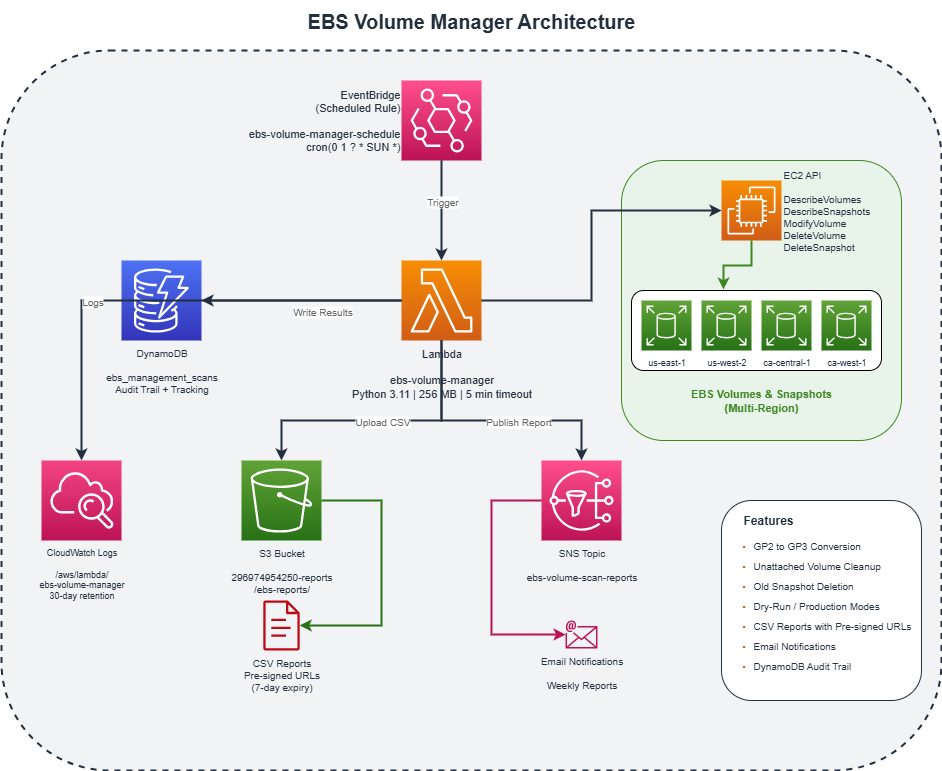
Key Design Principles
- Safety First: A two-phase deployment (dry-run, then production) ensures you can validate changes before they happen
- Multi-Region: Scans across all configured AWS regions in a single execution
- Audit Trail: Every action is logged to DynamoDB for compliance and troubleshooting
- Notifications: Detailed reports via email with CSV downloads for analysis
Architecture Deep Dive
1. AWS Lambda (The Brain)
The Lambda function is written in Python 3.11 and handles all the logic:
# Core configuration from environment variables
DRY_RUN = os.environ.get("DRY_RUN", "true").lower() == "true"
DYNAMODB_TABLE = os.environ.get("DYNAMODB_TABLE", "ebs_management_scans")
REGIONS = os.environ.get("REGIONS", "us-east-1,us-west-2").split(",")
Why Lambda?
- No servers to manage
- Pay only for execution time
- Built-in scaling and retry logic
- Easy integration with EventBridge for scheduling
2. EventBridge (The Scheduler)
EventBridge triggers the Lambda function on a schedule:
# Terraform configuration
resource "aws_cloudwatch_event_rule" "ebs_manager_schedule" {
  name                = "ebs-volume-manager-schedule"
  schedule_expression = var.ebs_schedule  # "cron(0 1 ? * SUN *)" for weekly
}
Scheduling Options:
rate(1 hour)- Hourly (good for testing)cron(0 1 ? * SUN *)- Weekly on Sunday at 1 AM UTC (production)cron(0 2 * * ? *)- Daily at 2 AM UTC
3. DynamoDB (The Audit Log)
Every scan and action is recorded:
Table: ebs_management_scans
- scan_id (partition key)
- volume_id (sort key)
- scan_timestamp
- region
- conversion_status
- error (if any)
This provides a complete audit trail for compliance and troubleshooting.
4. S3 + Pre-signed URLs (The Reports)
CSV reports are uploaded to S3 with pre-signed URLs that expire after 7 days:
def generate_presigned_url(s3_key):
    url = s3.generate_presigned_url(
        "get_object",
        Params={"Bucket": S3_BUCKET, "Key": s3_key},
        ExpiresIn=7 * 24 * 60 * 60  # 7 days
    )
    return url
5. SNS (The Notifications)
Email reports are sent via SNS with a clear summary:
==============================
EBS VOLUME MANAGEMENT REPORT
==============================

GP2 CONVERSION SUMMARY
----------------------
* Total GP2 Volumes Found: 15
* Would Convert: 12
* Skipped: 3
* Failed: 0

UNATTACHED VOLUMES SUMMARY
--------------------------
* Total Unattached Volumes: 5
* Eligible for Deletion (>5 days): 2
* Would Delete: 2
Feature 1: GP2 to GP3 Conversion
How It Works
The conversion uses the EBS Direct API, which performs online modifications - no downtime required:
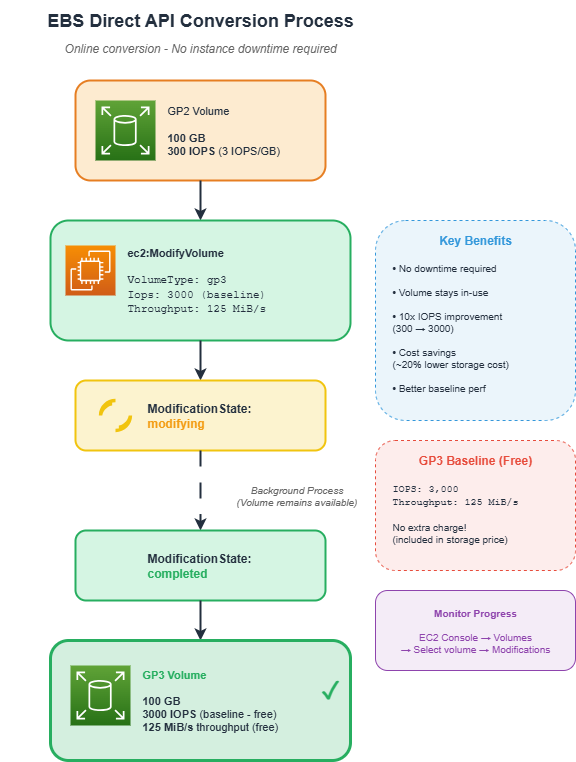
EBS volume modifications happen online. Your instances continue running and the volume remains accessible throughout the conversion process.
IOPS Strategy
| USE_BASELINE_IOPS | Behavior | Best For |
|---|---|---|
true (default) |
Always use GP3 baseline (3000 IOPS, 125 MiB/s) | Cost optimization |
false |
Match current GP2 IOPS | Performance-critical workloads |
Why baseline is usually better: Most workloads don't need more than 3000 IOPS. By using the baseline, you get 10x more IOPS than a 100 GB GP2 volume (300 vs 3000) with no additional IOPS charges and 20% storage cost savings.
Smart Skipping
The function intelligently skips volumes that shouldn't be converted:
# Skip unattached volumes - no point converting if not in use
if not vol.get("attached_instances"):
    results[volume_id] = {
        "status": "skipped",
        "reason": "Volume is not attached (handled by unattached cleanup)"
    }
    continue
Feature 2: Unattached Volume Cleanup
The Tracking System
Unlike simple "delete all unattached volumes" approaches, our system tracks how long volumes have been unattached:
def track_unattached_volume(volume_id, region, first_seen=None):
    table.put_item(Item={
        "scan_id": "UNATTACHED_TRACKING",  # Special partition key
        "volume_id": volume_id,
        "first_seen_unattached": timestamp,
        "region": region,
        "last_checked": datetime.utcnow().isoformat() + "Z"
    })
Configurable Threshold
| Environment Variable | Default | Description |
|---|---|---|
DELETE_UNATTACHED |
false |
Enable/disable deletion |
UNATTACHED_DAYS_THRESHOLD |
5 |
Days before deletion |
Deletion only occurs when both conditions are met: DELETE_UNATTACHED=true AND DRY_RUN=false. This double-safety prevents accidental data loss.
Feature 3: Snapshot Cleanup
Protected Snapshots
Not all snapshots should be deleted. The system automatically protects:
PROTECTED_SNAPSHOT_DESCRIPTIONS = [
    "Created by CreateImage",  # AMI snapshots
    "This snapshot is created by the AWS Backup service",  # AWS Backup
]

def is_protected_snapshot(description):
    for protected_prefix in PROTECTED_SNAPSHOT_DESCRIPTIONS:
        if description.startswith(protected_prefix):
            return True
    return False
Retention Policy
| Environment Variable | Default | Description |
|---|---|---|
DELETE_OLD_SNAPSHOTS |
false |
Enable/disable deletion |
SNAPSHOT_RETENTION_DAYS |
30 |
Days to retain snapshots |
Two-Phase Deployment
One of the most important aspects of this solution is the two-phase deployment approach.
Phase 1: Dry-Run (1-2 weeks)
environment {
  variables = {
    DRY_RUN = "true"  # Report only, no changes
  }
}
During dry-run:
- All volumes are scanned
- Reports show what would happen
- No actual changes are made
- Review CSV reports for unexpected items
Phase 2: Production
environment {
  variables = {
    DRY_RUN = "false"  # Perform actual changes
    DELETE_UNATTACHED = "true"  # Enable volume deletion
    DELETE_OLD_SNAPSHOTS = "true"  # Enable snapshot deletion
  }
}- Week 1-2: Dry-run, review reports
- Week 3: Enable GP2 conversion only (
DRY_RUN=false) - Week 4+: Enable unattached cleanup (
DELETE_UNATTACHED=true) - Week 5+: Enable snapshot cleanup (
DELETE_OLD_SNAPSHOTS=true)
Infrastructure as Code: Terraform
The entire solution is deployed using Terraform, making it reproducible and version-controlled.
Key Terraform Resources
Lambda Function: A standard aws_lambda_function resource wired to a zipped handler, Python 3.11 runtime, 5-minute timeout, 256 MB memory. The interesting part is the environment block which carries all the feature flags (DRY_RUN, DELETE_UNATTACHED, UNATTACHED_DAYS_THRESHOLD, DELETE_OLD_SNAPSHOTS, SNAPSHOT_RETENTION_DAYS) so behavior toggles without redeploying code.
IAM Policy (Least Privilege): The execution role gets read access for volumes and snapshots (ec2:Describe*), plus ec2:ModifyVolume, ec2:DeleteVolume, and ec2:DeleteSnapshot. Nothing else. I also scope DynamoDB and SNS actions to the specific resources the function uses.
Deployment Commands
cd terraform

# Initialize
terraform init

# Preview changes
terraform plan

# Deploy
terraform apply

# Verify
terraform output
Benefits & ROI
Cost Savings
| Category | Typical Savings |
|---|---|
| GP2 to GP3 conversion | 20% storage cost reduction |
| Unattached volume cleanup | 100% elimination of orphaned costs |
| Snapshot cleanup | 30-50% snapshot storage reduction |
Example Calculation
For an organization with 500 GP2 volumes (average 200 GB each), 50 unattached volumes (average 100 GB), and 1000 old snapshots (average 50 GB):
| Before | After | Monthly Savings |
|---|---|---|
| GP2: 100 TB x $0.10 = $10,000 | GP3: 100 TB x $0.08 = $8,000 | $2,000 |
| Unattached: 5 TB x $0.08 = $400 | $0 | $400 |
| Snapshots: 50 TB x $0.05 = $2,500 | 25 TB x $0.05 = $1,250 | $1,250 |
| Total | $3,650/month |
Annual Savings: $43,800
Operational Benefits
- Reduced Manual Work: No more spreadsheets tracking volumes to convert
- Consistent Enforcement: Policies applied uniformly across all regions
- Audit Compliance: Complete trail of all actions in DynamoDB
- Visibility: Weekly reports highlight storage trends
Troubleshooting Guide
Common Issues
1. No Email Reports
# Check SNS subscription status
aws sns list-subscriptions-by-topic --topic-arn <arn>
Make sure to confirm the subscription email.
2. Lambda Timeout
Increase timeout in Terraform:
timeout = 600 # 10 minutes for large environments3. Volume Modification Rate Exceeded
AWS limits modifications to 1 per volume per 6 hours. The function logs these and will retry on the next run.
4. Permission Denied
# Verify IAM policy
aws iam get-role-policy \
  --role-name ebs-volume-manager-role \
  --policy-name ebs-volume-manager-policy
Useful Commands
# View recent Lambda logs
aws logs tail /aws/lambda/ebs-volume-manager --follow

# Check volume modification status
aws ec2 describe-volumes-modifications --volume-ids vol-xxx

# Query DynamoDB audit records
aws dynamodb scan \
  --table-name ebs_management_scans \
  --limit 10
Conclusion
Managing EBS volumes at scale doesn't have to be a manual, error-prone process. With the EBS Volume Manager, you can:
- Automatically convert legacy GP2 volumes to GP3 for cost savings and better performance
- Eliminate orphaned storage costs by detecting and cleaning up unattached volumes
- Maintain snapshot hygiene while protecting critical AMI and backup snapshots
- Stay informed with detailed reports and complete audit trails
The two-phase deployment approach ensures you can validate changes before they happen, and the infrastructure-as-code approach using Terraform makes the solution reproducible, version-controlled, and easy to customize.
Next Steps
Consider extending this solution to:
- Add Slack/Teams notifications
- Integrate with your CMDB for volume ownership tracking
- Add cost allocation tags to reports
- Implement volume-level exclusion tags
Quick Reference
Environment Variables
| Variable | Default | Description |
|---|---|---|
DRY_RUN |
true |
Enable dry-run mode |
REGIONS |
us-east-1,... |
Regions to scan |
USE_BASELINE_IOPS |
true |
Use GP3 baseline IOPS |
DELETE_UNATTACHED |
false |
Enable volume deletion |
UNATTACHED_DAYS_THRESHOLD |
5 |
Days before deletion |
DELETE_OLD_SNAPSHOTS |
false |
Enable snapshot deletion |
SNAPSHOT_RETENTION_DAYS |
30 |
Snapshot retention period |
AWS Resources Created
| Resource | Name |
|---|---|
| Lambda | ebs-volume-manager |
| DynamoDB | ebs_management_scans |
| SNS Topic | ebs-volume-scan-reports |
| S3 Bucket | {account-id}-reports |
| EventBridge Rule | ebs-volume-manager-schedule |
| CloudWatch Logs | /aws/lambda/ebs-volume-manager |
| IAM Role | ebs-volume-manager-role |
Want Help With This?
If you're working on something similar and want a second set of eyes, or you'd like to talk through how this applies to your environment, reach out via the contact form. Happy to help.